
Hiện tại số lượng người dùng Blogspot đang rất là nhiều chủ yếu mọi người dùng để tạo Blog chia sẻ phần mềm, game và ứng dụng. Bạn đang muốn có một Mẫu đăng bài viết mới Blogspot dạng chia sẻ phần mềm chuẩn mobile và nội dung hay đẹp để làm nổi bật thông tin của phần mềm, ứng dụng bạn đang chia sẻ.
Trong bài viết này mình sẽ chia sẻ cho các bạn một mẫu mà mình hay dùng. Với mẫu này các bạn sẽ tạo được mẫu bài đăng giống với các mẫu bài đăng mà các Website chia sẽ trên mạng họ hay dùng.

Mẫu đăng bài viết mới cho Blogspot
Để tạo được mẫu này cũng rất đơn giản các bạn cứ làm theo hướng dẫn sau đây là sẽ có ngay một dạng bài viết khá đẹp và nhanh
- Tạo bài viết mới
- Chèn code bài đăng mới
Tạo bài viết mới
Cái này thì mình không phải nói rồi đúng không vì ai dùng Blogspot đều đã biết rồi. Các bạn tạo bài viết mới viết đầy đủ nội dung bài viết và hình ảnh xong như các bài viết bình thường khác
Chèn code bài đăng
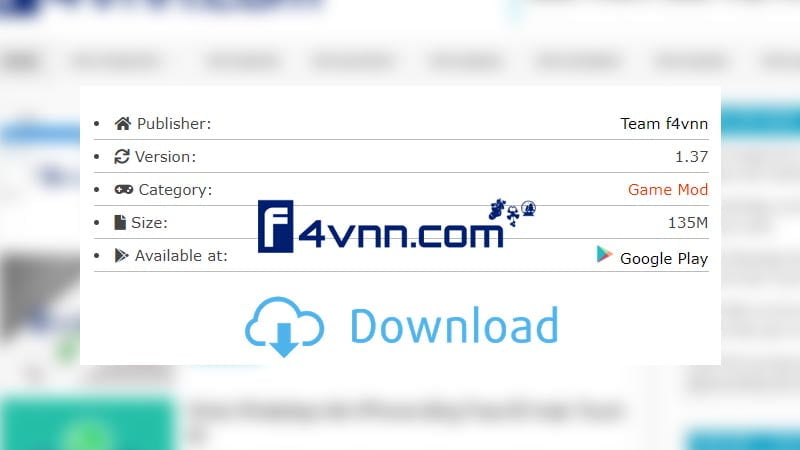
Các bạn chọn vị trí bảng thông tin ứng dụng này nó hiển thị chỗ nào của bài viết sau đó các bạn chuyển sang tab html dán đoạn code sau vào chỗ bạn đã chọn
<ul id="app-details" style="background-color: white; border: 0px; box-sizing: border-box; color: #444444; font-family: Verdana, Geneva, sans-serif; font-size: 15px; list-style: none; margin: 0px; padding: 0px;">
<li style="border-bottom-color: rgb(187, 187, 187); border-bottom-style: solid; border-image: initial; border-left-color: initial; border-left-style: initial; border-right-color: initial; border-right-style: initial; border-top-color: initial; border-top-style: initial; border-width: 0px 0px 1px; box-sizing: border-box; margin: 0px; padding: 5px 0px;"><span class="fas fa-home" style="border: 0px; box-sizing: border-box; display: inline-block; font-family: "font awesome 5 free"; font-weight: 900; line-height: 1; margin: 0px; padding: 0px;"></span> Publisher:<span class="right" style="border: 0px; box-sizing: border-box; float: right; margin: 0px; padding: 0px;"><a href="https://f4vnn.com/" rel="tag nofollow" style="border: 0px; box-sizing: border-box; color: black; margin: 0px; padding: 0px; text-decoration-line: none; transition: all 0.3s ease-out 0s;" target="_blank">Team f4vnn</a></span></li>
<li style="border-bottom-color: rgb(187, 187, 187); border-bottom-style: solid; border-image: initial; border-left-color: initial; border-left-style: initial; border-right-color: initial; border-right-style: initial; border-top-color: initial; border-top-style: initial; border-width: 0px 0px 1px; box-sizing: border-box; margin: 0px; padding: 5px 0px;"><span class="fas fa-sync" style="border: 0px; box-sizing: border-box; display: inline-block; font-family: "font awesome 5 free"; font-weight: 900; line-height: 1; margin: 0px; padding: 0px;"></span> Version:<span class="right" style="border: 0px; box-sizing: border-box; float: right; margin: 0px; padding: 0px;">13.180.16</span></li>
<li style="border-bottom-color: rgb(187, 187, 187); border-bottom-style: solid; border-image: initial; border-left-color: initial; border-left-style: initial; border-right-color: initial; border-right-style: initial; border-top-color: initial; border-top-style: initial; border-width: 0px 0px 1px; box-sizing: border-box; margin: 0px; padding: 5px 0px;"><span class="fas fa-gamepad" style="border: 0px; box-sizing: border-box; display: inline-block; font-family: "font awesome 5 free"; font-weight: 900; line-height: 1; margin: 0px; padding: 0px;"></span> Category:<span class="right" style="border: 0px; box-sizing: border-box; float: right; margin: 0px; padding: 0px;"><a href="https://moddroid.com/games/strategy" rel="category tag nofollow" style="border: 0px; box-sizing: border-box; color: black; margin: 0px; padding: 0px; text-decoration-line: none; transition: all 0.3s ease-out 0s;" target="_blank">Strategy</a></span></li>
<li style="border-bottom-color: rgb(187, 187, 187); border-bottom-style: solid; border-image: initial; border-left-color: initial; border-left-style: initial; border-right-color: initial; border-right-style: initial; border-top-color: initial; border-top-style: initial; border-width: 0px 0px 1px; box-sizing: border-box; margin: 0px; padding: 5px 0px;"><span class="fas fa-file" style="border: 0px; box-sizing: border-box; display: inline-block; font-family: "font awesome 5 free"; font-weight: 900; line-height: 1; margin: 0px; padding: 0px;"></span> Size:<span class="right" style="border: 0px; box-sizing: border-box; float: right; margin: 0px; padding: 0px;">110M</span></li>
<li style="border-bottom-color: rgb(187, 187, 187); border-bottom-style: solid; border-image: initial; border-left-color: initial; border-left-style: initial; border-right-color: initial; border-right-style: initial; border-top-color: initial; border-top-style: initial; border-width: 0px 0px 1px; box-sizing: border-box; margin: 0px; padding: 5px 0px;"><span class="fab fa-google-play" style="border: 0px; box-sizing: border-box; display: inline-block; font-family: "font awesome 5 brands"; line-height: 1; margin: 0px; padding: 0px;"></span> Available at:<span class="right" style="border: 0px; box-sizing: border-box; float: right; margin: 0px; padding: 0px;"><a href="https://play.google.com/store/apps/details?id=com.supercell.clashofclans" rel="nofollow" style="border: 0px; box-sizing: border-box; color: black; margin: 0px; padding: 0px; text-decoration-line: none; transition: all 0.3s ease-out 0s;" target="_blank"><img class="lazyloading" data-was-processed="true" src="https://moddroid.com/wp-content/uploads/2018/08/Webp.net-resizeimage-1.png" style="border: 0px; box-sizing: border-box; height: auto; margin: 0px; max-width: 100%; padding: 0px;" width="20px" /> Google Play</a></span></li>
</ul>Sau khi các bạn đã dán các bạn chuyển sang tab bài viết bình thường sửa thông tin cho phù hợp với nội dung của bạn.
Lưu ý: Nếu các bạn muốn chỉnh sửa icon cho từng mục thì các bạn sao chép code ra notepad và tìm các fa fa-(tên icon) để thay thế nhé
Chúc bạn thành công!
Xem thêm :Tại Đây
Blog Download Template Blogspot : Tại Đây
Blog Download Phần Mềm Free : Tại Đây
Blog Download Acapella : Tại Đây
Trang mã hóa URL : Tại Đây
Link liên kết : Downmienphi.top